
For practices reviewing their payroll software
Payroll software you can rely on, every pay day
If your payroll software has become more expensive, lost features in a move to the cloud or got harder to get help with, My Digital Payroll is worth a look. It runs the PAYE payrolls you run today, and we check every line against your current system before you switch.
- Cloud-based, so it runs in your browser
- Every line checked against your current system before you switch
- Helpdesk answers in under a minute on average
See if it fits your practice
A live demo with our team, built around the payrolls you run now. Bring your questions about switching.
We publish our helpdesk response and resolution times on LinkedIn every week.
What's included
Everything your clients' payroll needs, in one place
The things you'd check first when comparing payroll software. All of them are in the product today.
HMRC-recognised RTI
FPS and EPS submissions go straight to HMRC through Government Gateway, along with BiK submissions.
Pensions and auto-enrolment
Full auto-enrolment support, contribution calculations, custom provider files and automated refunds.
Holiday worked out for you
Accrued holiday is calculated automatically every pay period.
Payslips and employee app
Branded payslips with personal notes, plus a portal and mobile app where employees see payslips and holiday.
A portal for your clients
Clients get secure access to their payroll reports and documents, so fewer attachments go back and forth by email.
All your clients on one screen
See where every client's payroll is up to, with approvals and scheduled FPS and payslip runs.
The awkward runs
Supplementary runs for out-of-cycle payments, and up to two court orders per employee at the same time.
Xero and QuickBooks
Live integrations with both, plus bank file generation for each pay run.
No employee limits
Add clients and employees as your practice grows. There's no cap on either.
Support
A payroll person on the other end, quickly
When something goes wrong on pay day, you need someone who knows payroll, and you need them now. Our helpdesk answers in under a minute on average and resolves queries in under two hours.
We publish both numbers on LinkedIn every week, so you can check them before you ever speak to us.
See this week's numbers on LinkedIn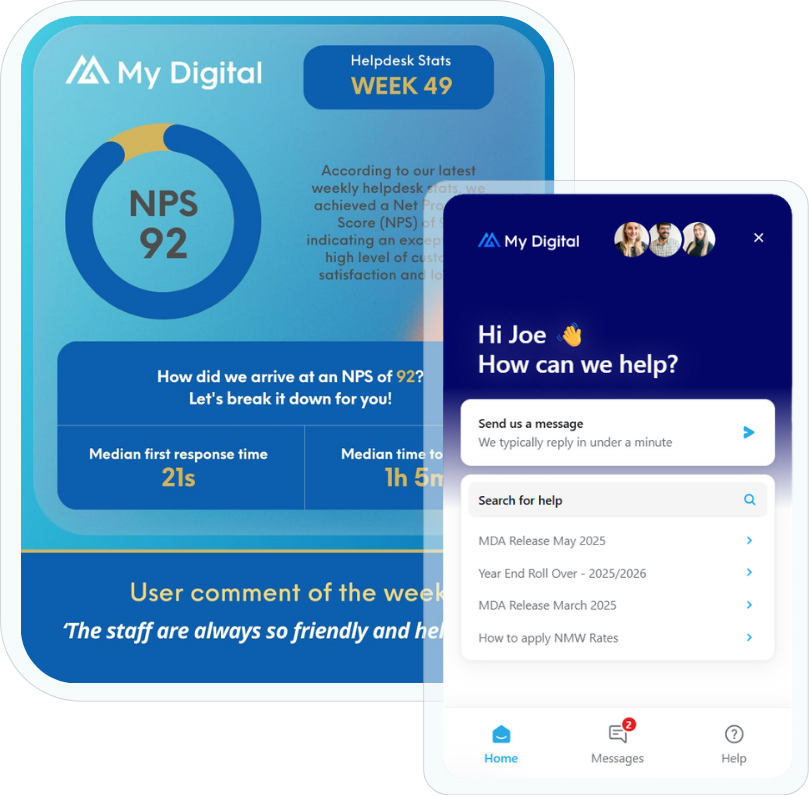
We spent 18 months talking to hundreds of payroll professionals before we wrote a line of code. The two complaints we heard most were retyping client data and support that's hard to reach, so we built around both.
Switching
Switching, with every line checked
If your software is being retired or your renewal price has jumped, you may be moving soon anyway. This is how a move to us works, and why you won't go live on numbers you haven't checked.
-
STEP 1
Kick-off call
We walk you through the whole migration, explain what happens at each stage and agree the timelines with you.
-
STEP 2
Data import
Company and employee details come across. Your current provider supplies the FPS, P11s, pension reports and P30, and we help you complete the templates.
-
The safety net
STEP 3
Parallel run
Your current provider processes your final payroll while we run the same payroll alongside it. Then we compare the outputs line by line.
-
STEP 4
Go live
Once you've signed off the comparison, we take over. Our helpdesk is with you from the first live run.
Our team has completed more than 90 payroll software implementations. On the demo we'll talk through what a move would look like for your practice.
Book a demoSince going live, the impact has been significant. Internal processes have become much more efficient, particularly with onboarding employees.
 Paris SheppardFinance Director, PayGuardians
Questions practices ask us
How is it priced?
Simple per-employee, per-month pricing that scales with your volume. Once we know how many payslips you run, we'll give you a quote on the demo, before you commit to anything.
Do we have to use the automated import?
No. It's there to save you retyping the spreadsheets clients send, and you review everything it brings in before it's used. If you'd rather key figures in yourself, you can.
How long does switching take?
We agree the timeline with you on the kick-off call, based on how many clients and employees you're moving. You only go live once the parallel run matches and you've signed it off.
What do we need from our current provider?
Your FPS, P11s, pension reports and P30. We give you templates for the rest and help you fill them in.
What does support look like?
You get the same helpdesk our existing customers use. On average it answers in under a minute and resolves queries in under two hours, and we publish those numbers on LinkedIn every week.
Is there a limit on employees or clients?
No. You can add as many clients and employees as your practice needs.
Mission control for bureaus and accountants
See it with your own payrolls in mind
Tell us a little about your practice and we'll set up a demo around the payrolls you run. If you'd rather talk now, give us a call.
0161 925 6162Book a demo
Four quick fields. We'll be in touch to find a time.